
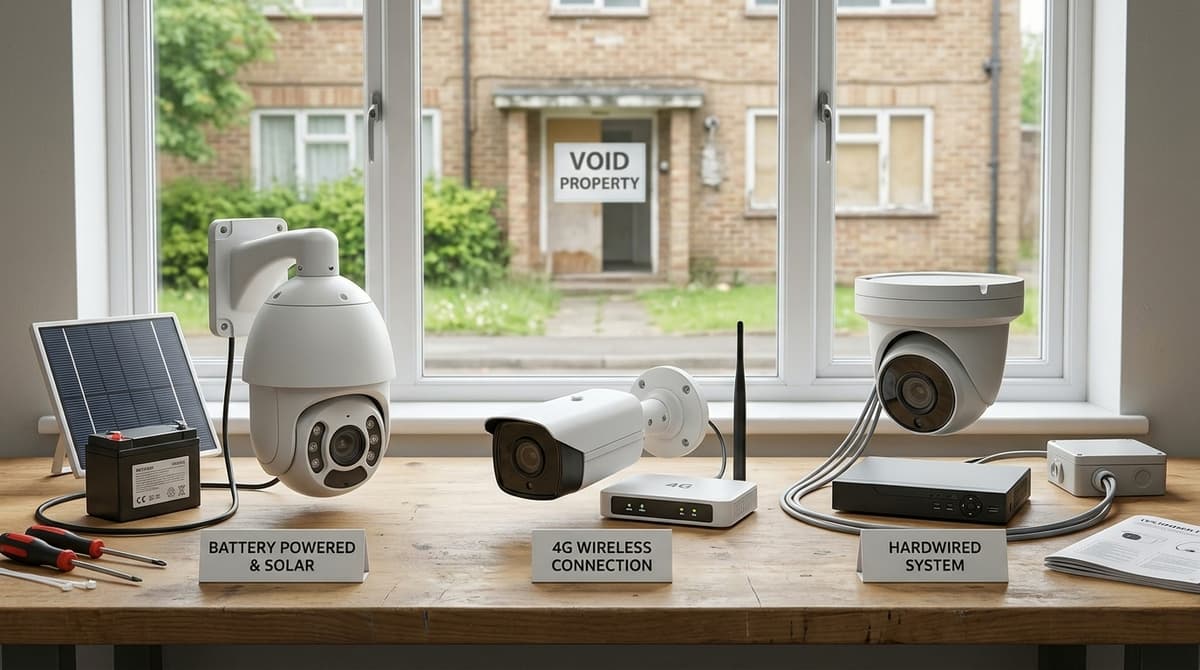
For a short void, CCTV that you can lift and reuse, such as a battery or 4G camera, usually beats a hardwired system for a void property. Hardwiring only pays off when voids are frequent or long and the building already has a safe, sheltered cable route. Either way, UK GDPR still applies once cameras are recording and contractors are on site, so decide who is responsible for the footage before you install.
Battery, 4G or hardwired: which CCTV suits a void property?
Hardwired is the best default for a property you will leave empty more than once. Battery and 4G units suit shorter, one-off vacancies where running cable isn't practical.
- Battery or wire-free: This suits a short void where you need a camera up quickly and may move it later. The trade-off is that someone must return to swap batteries, and recording is limited by the storage built into the unit.
- 4G (SIM-connected): This suits a building with no broadband, because live view and alerts travel over the mobile network. You pay for data on an ongoing basis, and performance depends on the signal at the site.
- Hardwired: Recording doesn't depend on battery levels or a mobile signal, which makes it the sensible choice for repeated voids. The cost is cabling time up front, and it assumes there is power on site. For network cameras, our PoE cameras for security guide explains why getting the power side wrong can damage network interface cards.
For a coax system, the 30m RG59 CCTV cable carries BNC video and DC power on one lead and costs £10.34 including VAT. Typical run limits are 250m for CVBS analogue and 80-120m for HD-over-coax, so confirm the camera's format before planning a long run.
If you pick a model with a microphone or speaker, read when sound recording is lawful before switching audio on.
Where should cameras go in an empty property?
Put cameras on the entry points first, then the interior; this is general siting guidance rather than a measured result.
Outside and at the doors
- Entry points: cover the front and rear doors, any ground-floor windows and side access. These are the routes an intruder or squatter is most likely to use.
- Fly-tipping hot spots: rear yards, gates, parking pads and bin stores are where dumping tends to happen. A camera here records vehicles and faces at the moment it matters.
- Contractor access: point one camera at the key safe or lockbox and the route in. Arrival and departure times then sit on record, which settles disputes about who was on site and when.
Inside the void
A void rarely needs a camera in every room. Pointing units along hallways and at internal doors usually shows movement through the building with far fewer cameras to power, cable and review.
Keep the field of view on your own premises. A camera that catches a neighbour's windows or garden is the usual starting point for a "CCTV looking into my property" complaint. Angle it down, and use privacy masking where the camera supports it.
For mounting and lens choice, let the distance to the door or gate decide, and take the figures from the datasheet of the model you are buying.
How should motion recording and remote alerts be set up for a void?
Use motion-triggered recording with push alerts for any entry outside working hours, because nobody on site will notice a break-in otherwise. Three settings do most of the work on a void property CCTV system:
- Schedule alerts around the contractors. Arm notifications only outside their working hours. The phone then stays quiet during the day, and a trigger at 2am gets attention.
- Mask what you don't need. Block out trees, roads and neighbouring windows in the motion zones. This cuts false alerts from moving branches and passing traffic, and it keeps neighbours' homes out of your recordings, which reduces privacy risk.
- Test the alert path at handover. Trigger the cameras deliberately and confirm that the app or NVR notification arrives on a named person's phone. Name a second person as backup, and check the phone itself as well as the app settings.
A camera that nobody is watching deters and records, but it does not respond. An alert only helps if the person receiving it can act, for example by calling the police or a keyholder.
If you want someone to watch the site and react, that is a separate monitoring arrangement. Our site CCTV hire vs buy guide will help you decide whether to rent or own the kit for a short vacancy.
What is the budget difference between kit types across a void cycle?
Hardwired kits cost most to fit but least per void once they serve repeated voids; battery and 4G kits reverse that.
The model below works for any kit, and you fill in the live figures yourself:
Cost per void = (purchase price ÷ number of voids the kit will serve)
              + SIM or data cost for the void length
              + time and cost of the installer or electrician visit
Hardwired
Fitting is the heaviest term, because your own electrician or an independent installer has to run cable and set up the recorder. That cost is paid once, so dividing the purchase price across many voids drives the per-void figure down. The cable is a minor line: a 30m RG59 BNC video and DC power cable is £10.34 including VAT. Where runs pass close to mains or other interference, our guide on whether you need shielded CCTV cable helps you decide before buying.
Battery or 4G
Fitting is the lightest term, often little more than mounting the unit. The cost shifts into recurring consumables and the SIM or data plan, which grows with every week the void lasts. A single long void, or a unit moved between buildings, can still favour this route.
Checking the numbers
Prices change, so read them on the live product pages rather than from any article. Housing associations and portfolio landlords buying several units can shop at CCTV Master or ask about trade pricing, which affects the purchase-price term in the formula.
How do you remove and reuse CCTV between tenancies?
Plan removal on day one, so the cameras, recorder and any footage leave with the void rather than staying in a tenanted home.
Keep a log for each property: where every camera sits, the install date, the removal date and who holds the footage. It tells you what to collect on the day, and it answers the question if someone later asks what was recorded and where it went.
Before void property CCTV kit moves on to the next address:
- Export any footage you need to keep, such as an incident, then wipe the recorder's drive.
- Reset the recorder credentials and set fresh ones at the next site, so no old login travels with the equipment.
- Take down the cameras, brackets and cabling you own, and note in the log anything deliberately left behind.
- Fill and make good the mounting holes. Budget for this when you choose fixings, because every drilled bracket leaves a repair.
Decide early whether a permanent system stays with the property and who owns it. Cabling run through walls is slower to remove than a bracket-mounted camera on a temporary setup. A recorder that stays also needs protection from power being cut between occupiers, and our UPS for CCTV sizing guide explains how to size one.
Leaving cameras in place for the next tenancy changes the legal position. You would then be recording people at or around their home, so you need a documented lawful basis, clear notice and signage, and should check the ICO's CCTV guidance before deciding. Where the cameras point matters: a shared entrance is a different case from anything covering private areas.