
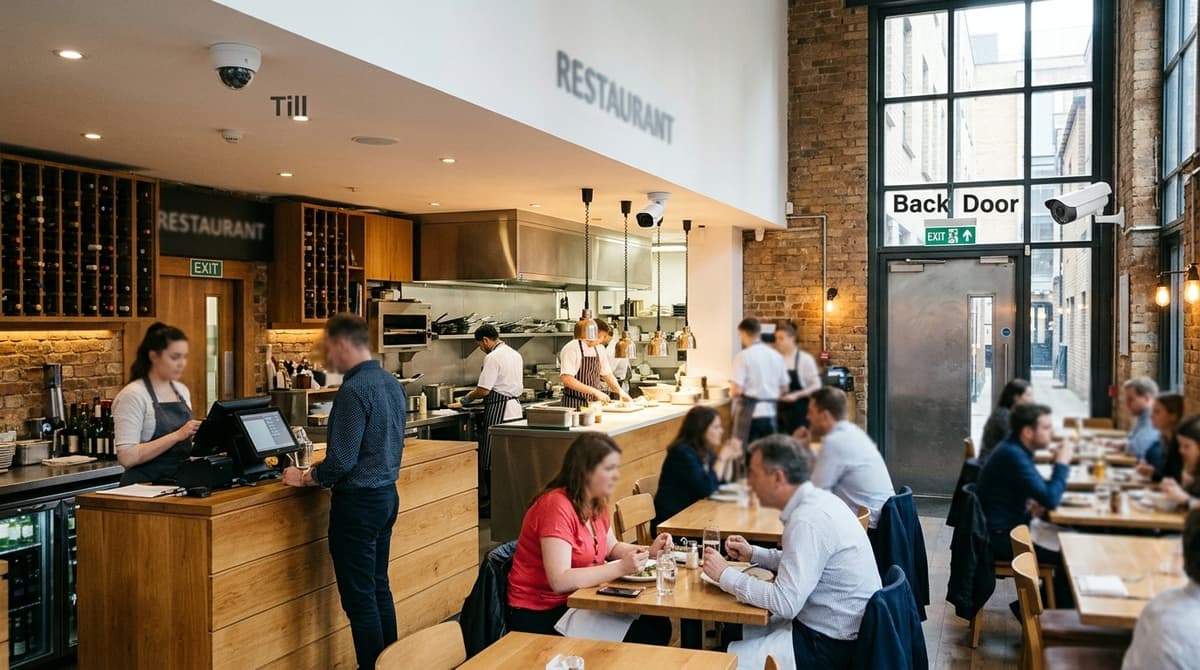
A restaurant CCTV system is a handful of cameras placed zone by zone: the till and card terminal, kitchen, back door and bin store, and stock cellar, with a low-light pass over the dining room. Each zone fails differently, so camera choice and position matter more than total camera count. The main caveat is that footage of staff and diners is personal data under UK GDPR, so decide your purpose, signage and retention period before the first camera goes up.
What does a restaurant CCTV system need to cover?
Four zones: till and card terminal, kitchen, back door and bin store, and stock and cellar, plus a low-light pass over the dining room.
- Till and card terminal: frame the drawer, the screen and the hands at the card machine closely enough to see what happens at the transaction.
- Kitchen: cover the pass, the cooking line and the walk-in door. Steam and grease make the IP rating and cleaning access worth checking on each datasheet.
- Back door and bin store: this catches deliveries, staff exits and after-hours activity, usually in poor light, so infrared range matters.
- Stock and cellar: cover the door and the aisle where stock is picked.
- Dining room: evenings are dim, so compare sensor size and minimum-lux figures on the datasheets rather than a generic "night vision" label.
How many cameras those zones add up to depends on your layout. Our guide to business CCTV camera counts covers the whole-premises picture.
Sizing the recorder and switch
Storage needed = camera count × bitrate × 86,400 seconds × retention days, divided by 8 to convert bits to bytes. Take each camera's bitrate from its datasheet or your chosen stream settings. Retention days should follow your documented purpose, since UK GDPR expects footage to be kept no longer than necessary.
PoE budget: the sum of each camera's PoE draw, from its datasheet, must stay within the switch's total PoE budget, and each draw within the per-port limit. Leave headroom for added cameras.
Recorder type and cabling
An NVR records IP cameras over the network, usually powered by PoE. A DVR takes analogue cameras over coax. For a new restaurant installation, IP with an NVR is the usual choice.
As general installer guidance, wired PoE suits kitchens and cellars full of steel, steam and thick walls. Wireless is a compromise for runs that are awkward to cable.
How do you cover the till and card terminal for chargebacks and cash disputes?
Mount one camera above and slightly in front of the till, angled down at the drawer and counter, and keep the PIN pad out of frame.
That angle shows cash going in and out, change being handed over and the customer's side of the counter. Pointing the lens at the PIN pad risks recording PIN entry, which is both a privacy and a card-security problem. Reposition the camera or use privacy masking if your recorder supports it (check the datasheet). A dome or a turret will do the job here, so choose between them on vandal exposure and ease of cleaning rather than till coverage.
Overlay the till data
Some recorders can overlay text from the till (item lines and totals) onto the video, so a disputed sale can be found by time and amount instead of scrubbing through a shift. Whether that works depends on compatibility between your recorder and your till, so check the recorder datasheet and ask your till supplier what it can output before you buy.
Handle a dispute
The same steps apply to a cash discrepancy and a chargeback:
- Compare the till's timestamp with the recorder's clock and note any offset. Keep the recorder on NTP time sync so the gap stays small.
- Locate the sale by time, or by amount if overlay is available.
- Export the clip, and leave the original recording untouched.
- Record who exported it and when. The footage shows identifiable people, so limit access under UK GDPR.
Chargebacks can arrive long after the sale, so ask your card provider how long they run and make sure your retention is not shorter. A short outage can also leave a gap exactly when you need footage, which is why a UPS sized for your CCTV recorder and cameras is worth fitting at the till position.
Which camera housing copes with kitchen heat, grease and steam?
Choose the housing on the datasheet's operating temperature range and sealing details, because an IP66 or IP67 rating describes dust and water ingress only, not heat tolerance.
IP66 means the case resists powerful water jets, and IP67 means it survives short immersion. Neither figure says how hot the camera can run. Read the minimum and maximum operating temperature on the datasheet against the air temperature at the mounting point, which near a fryer line can be well above the rest of the room.
Placement
- Keep cameras away from hobs, fryers and extraction outlets, where hot, greasy air concentrates.
- Mount above the steam plume where ceiling height allows, since heat and vapour rise.
- Pick a compact, smooth body with few ridges for grease to settle in, and a clear-lens housing that hygiene staff can wipe down without dismantling it.
Turret or dome
Many installers favour turrets in greasy kitchens because there is no dome bubble to smear, so a quick wipe restores the picture. That is a common view rather than a rule. A dome is more vandal-resistant, which counts near a back door or any area the public can reach, and it works in a kitchen too if it is cleaned on a schedule.
Staff privacy limits
Point cameras at the cooking and prep areas, the walk-in and the pass. Keep them out of staff changing rooms and toilets, where recording is very hard to justify under UK GDPR and the ICO's CCTV guidance.
Microphones raise a separate question, because capturing conversations is more intrusive than capturing images. Our guide to when sound recording is lawful in UK CCTV explains when audio can be justified; until you have a clear reason, disable it.
What about the back door, bin store and dining room at night?
Put one camera on the back door and a wider one over the yard or bin store, both with infrared or strong low-light performance.
The door camera records who comes and goes, which settles delivery-short disputes. The wider view catches fly-tipping and anyone approaching after closing, so an after-hours break-in is on record from the approach, not just the forced door.
Dining room
Evening service mixes dim ambient light with bright bar displays or windows in the same frame. Ask for wide dynamic range (WDR) so faces and floors stay readable despite the glare. Lorex PRO lists WDR among its features for restaurant entrances and exits, where outside and inside light meet.
Cover the entrance and the aisle routes, plus any floor-level slip point such as the kitchen pass. Slip-and-fall claims tend to turn on footage of the floor and its surroundings. A view showing the surface, any warning signage and who was nearby is worth more than a tight shot of one table.
A private car park is a separate job. ANPR cameras are designed to read number plates, which general dining-room or door cameras are not.
How do you protect stock and the cellar, and what do the rules say about footage?
Cover the cellar door and the shelving aisle with fixed cameras, and keep footage only as long as you can justify in writing.
Stock and the cellar
A warehouse cctv system concentrates on two things: the doors goods pass through and the aisles where they sit. That logic scales down to a cellar or walk-in. The door camera records who enters and when, and a camera at the end of the aisle shows what leaves the shelf.
Dim cellars suit a low-light camera. In a cold room, read the operating temperature range on the datasheet before buying, because it differs from model to model and many cameras are not specified for freezing conditions.
Staff, customers and audio
UK GDPR and the ICO's CCTV guidance expect a clear purpose, signs at the entrance and a retention period. Beyond that basic checklist, a cellar is a staff workplace, so tell your team what the cameras are for before they go live. Keep them out of changing areas and toilets. Someone must also be able to find and export a clip when a subject access request arrives, with other people's faces masked.
Audio is a separate lawful-basis question. Leave microphones disabled until you have assessed that on its own merits. Our restaurant CCTV guide covering zones, kitchen cameras and GDPR goes through the front-of-house side.
How long should you keep footage?
No single legal figure applies to restaurants. UK GDPR requires footage to be kept no longer than necessary, so the period is yours to justify.
Work backwards from how long a chargeback, injury claim or stock discrepancy typically takes to surface. Ask your card provider about dispute windows and your insurer about claim notification terms. Write the resulting period down, then size the recorder's storage to match.