
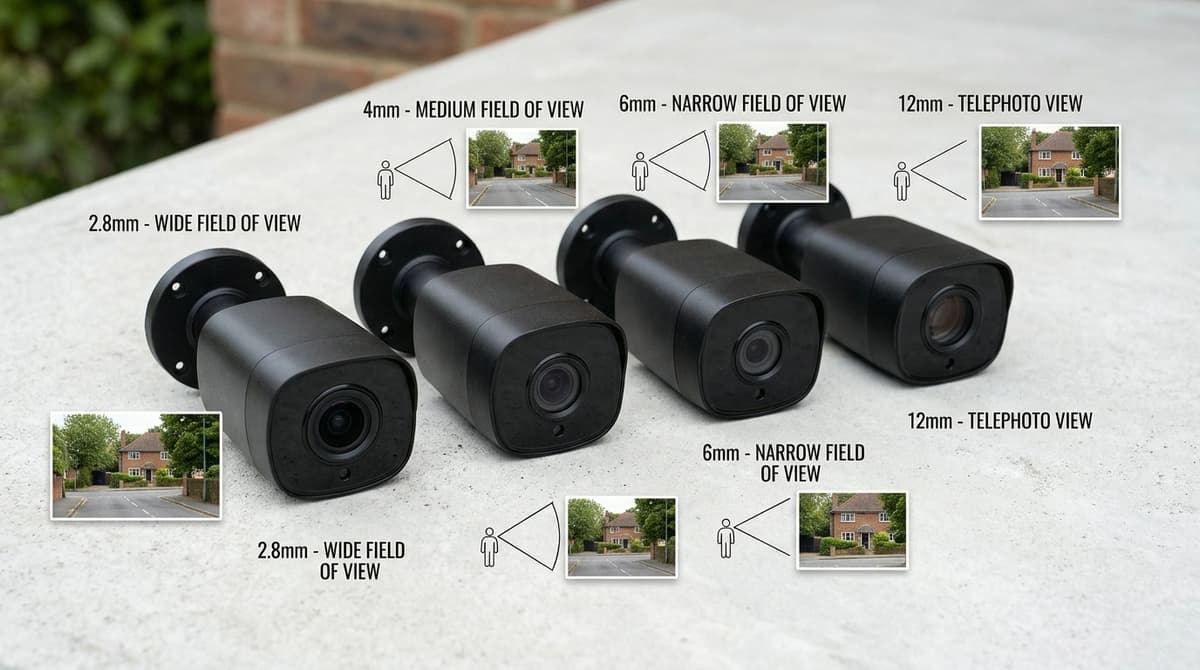
CCTV lens size is the focal length in millimetres, and you should pick it by the width you must cover at a given distance, not the number alone. Fixed lenses commonly come as 2.8mm and 4mm, and varifocals span ranges such as 2.8-12mm (general guidance rather than a standard). For example, our 2MP HD 4in1 Dome Camera (2.8mm/ White) has a 2.8mm fixed lens. Sensor size and resolution shift the real field of view, so take the horizontal angle from the datasheet of the camera you choose. Remember that how far away you can recognise a face depends on pixel density, not the lens alone.
What does CCTV lens size mean, and how do you read it?
To read it, find the "Lens" line in the datasheet or product specification, or the figure printed on the lens barrel. Our 2MP HD 4in1 dome camera (2.8mm / white) lists a 2.8mm fixed lens, and that is the number to weigh against the area you need to cover. A varifocal camera shows a range instead, and you set the working figure when the camera is installed.
There is no single standard size. As general guidance, fixed lenses commonly come as 2.8mm and 4mm, and varifocal lenses typically span a range such as 2.8-12mm, as XLR Security describes. Angle of view also depends on sensor size, so the same millimetre figure does not give identical coverage on every camera. Treat any CCTV camera lens size chart as valid only for the sensor format it was drawn up for.
Photography uses a separate vocabulary. Figures like 35mm or 50mm, and advice on the best camera lens size for portrait work, belong to camera systems with different sensor formats and don't translate to CCTV millimetres. Compare CCTV lenses only with other CCTV lenses.
How do you choose a lens by target width and mounting height?
Pick the lens whose horizontal angle of view covers your required scene width at the subject's distance, then check pixel density and tilt from the mounting position.
Start with two numbers: the width you must cover where the subject will stand, and where the camera will be fixed. Then read the horizontal angle (HFOV) from the camera's datasheet, not from the millimetre figure alone. Published charts disagree: TP-Link's lens table lists a 2.8 mm lens at 81° on a 1/3" sensor, while the CCTV Camera Pros chart gives 109° for the same pairing.
The geometry
scene width = 2 × D × tan(HFOV ÷ 2)
D is the distance from lens to subject and HFOV is the datasheet's horizontal angle. If the width comes out narrower than the area you need to watch, you need a wider lens.
Pixel density
pixels per metre = horizontal pixels ÷ scene width
The 2MP HD 4in1 Dome Camera (2.8mm/ White) records 1920 × 1080. Spread across a 10 m wide scene, that is 192 pixels per metre, and across 5 m it is 384. Judge detail by this number at your own distance rather than by a generic "recognition distance".
Mounting height and tilt
Height lengthens D. Use the slant distance, √(ground distance² + mounting height²), in the formula above and when checking the dome's IR reach of up to 20 m.
Confirm that a dome's tilt range can still put the subject inside the frame from your mounting point. No standard mounting height applies to every site, so take the limits from the datasheet and installation guide. For several cameras across one premises, our guide to choosing a CCTV system for a business helps you plan the whole layout.
What do 2.8mm, 4mm and 6mm each cover?
On the dome camera's datasheet, 2.8mm gives 103° horizontal, 3.6mm gives 80.7° and 6mm gives 50.1°, so each step up trades width for a larger subject.
| Lens | Horizontal FOV (datasheet) | Scene width at 5 m (geometry) |
|---|---|---|
| 2.8mm | 103° | about 12.6 m |
| 3.6mm (nearest to 4mm) | 80.7° | about 8.5 m |
| 6mm | 50.1° | about 4.7 m |
The widths are calculated as 2 × distance × tan(half the angle) at an assumed 5 m, and ignore lens distortion. The datasheet gives no angle for 4mm, so 3.6mm stands in as the closest published figure. A 4mm lens will be a little narrower than that, so read its exact angle off the datasheet of the camera you intend to buy.
Spreading a 1920 × 1080 image across 12.6 m gives roughly 150 pixels per metre of scene width. The same image across 4.7 m gives roughly 410. That is the detail cost of going wide, in line with TP-Link's guidance that shorter focal lengths cover more and longer ones magnify more.
Sensor size changes the angle too. On one published lens chart, a 2.8mm lens reads 114° on a 1/2.7" sensor but 83° on a 1/3.2" sensor. Compare angles, not millimetres, across brands.
Illustrative UK uses
These are examples for orientation, not recognition-distance claims.
- 2.8mm: a front door, porch or small rear yard, where one camera should take in the whole space.
- 4mm: a driveway or side gate, as a middle ground between coverage and subject size.
- 6mm: a narrow passage, gate or long boundary run, where subject size matters more than width. A long run also means a long cable pull, and our guide to whether you need shielded CCTV cable in the UK covers that choice.
When should you switch to a varifocal lens?
Switch to a varifocal lens when you can't confirm the camera-to-target distance before ordering, or when you expect to fine-tune the framing on site. Varifocals typically run from about 2.8mm to 12mm, which is a wide view at one end and a tight one at the other. TP-Link's lens table lists 81° at 2.8mm and 21° at 12.5mm on a 1/3-inch sensor, which gives a feel for that span.
Reasons to choose one:
- You can't measure the distance before ordering.
- The target distance is uncertain.
- The scene may change, such as a new fence, a moved parking bay or an extension.
- You want to adjust the framing once the camera is up.
The trade-off
A fixed lens is simpler and often cheaper, with nothing to adjust or mis-set. A varifocal adds flexibility but needs setting up, and it must be refocused after any change to the zoom. A rushed, slightly soft varifocal can give worse footage than the right fixed lens would.
When fixed is fine
If the goal is a wide-area view at a short, known distance, a fixed lens does the job. Our 2MP HD 4in1 Dome Camera (2.8mm/ White) is a 1920 × 1080 dome with a fixed 2.8mm lens, IP66 rating and EXIR 2.0 infrared to 20m.
Fitting and aiming
CCTV Master sells the equipment and does not install it. Your own electrician or an independent NSI or SSAIB installer should fit and aim it, ideally with a monitor on site to set a varifocal. The product's datasheet or installation guide covers the adjustment procedure.
Does your lens choice still meet ICO and BS EN 62676 expectations?
Only if the lens gives enough pixels on the subject for your stated purpose and stays within the area you mean to monitor. Whether a given standard or ICO expectation applies depends on the site and what the system is for.
A wide lens is the usual culprit. Per the CCTV Camera Pros lens chart, a 2.8mm lens gives roughly 111° horizontal on a 1/2.8" sensor and 109° on a 1/3" sensor, so always match the figure to the sensor size. A 1080p image spreads the same 1920 × 1080 pixels across all of that view. TP-Link's lens guidance makes the trade-off plain: shorter focal lengths widen coverage, while longer ones magnify and reach further. A camera that "sees everything" may therefore show a face or number plate too small to be useful.
The same wide view can also take in a neighbour's property or public space you never intended to record. Where a system is designed to BS EN 62676 image-quality targets, or where ICO CCTV guidance applies, you would normally need to justify what is captured, how proportionate it is, and how signage covers it.
If a wide lens fails either test, a narrower fixed lens or a varifocal model is the usual fix. You can shop at CCTV Master or ask about trade pricing.