
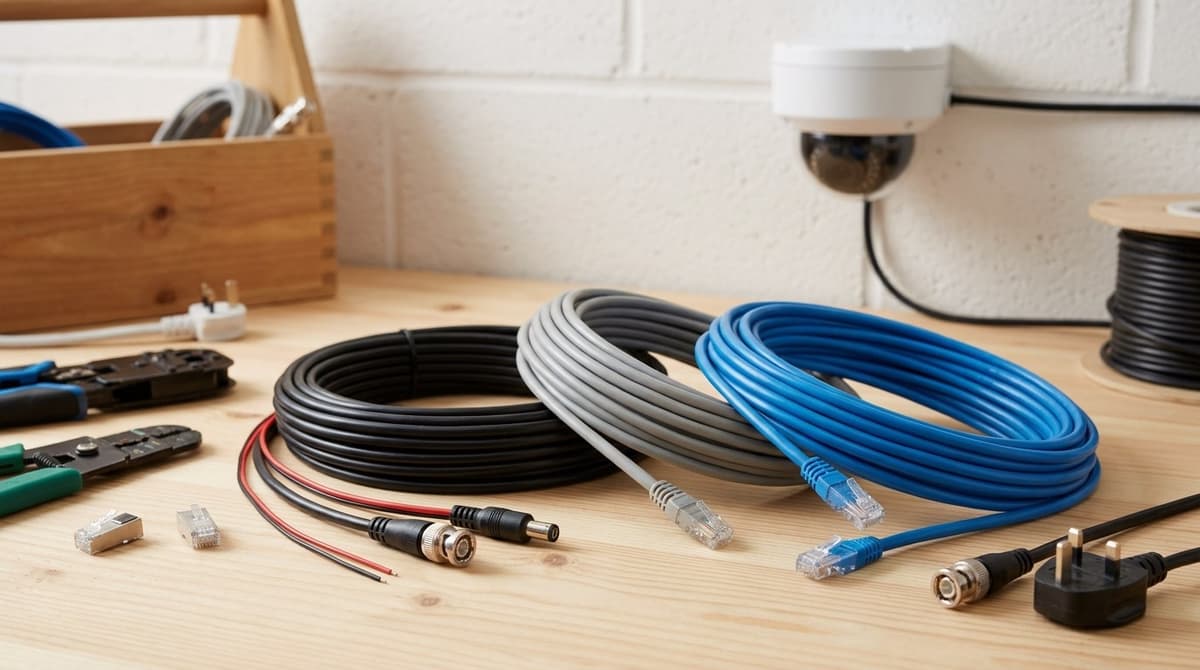
CCTV camera wire depends on the camera: analogue HD cameras (HD-TVI, AHD, CVI, CVBS) use RG59 75-ohm coax, usually siamese with power cores, while IP and PoE cameras use Cat5e or Cat6. Siamese (shotgun) cable carries video and power in one run, and a PoE network cable carries data and power together, so most installs need only one cable per camera.
Cameras on a central PSU need video cable plus a separate power-only pair. Run length, voltage drop and where the cable is routed then decide the exact spec, so check the camera's datasheet for its power draw before you buy a reel.
Which CCTV camera wire does each camera type need?
Analogue HD cameras on a DVR use RG59 75-ohm coax with BNC plugs, often siamese with a power pair. IP cameras on an NVR or PoE switch use Cat5e or Cat6, which carries power as well as data only when the camera and the recorder or switch port both support PoE. A non-PoE IP camera needs its own power feed.
The camera's interface decides the cable, so settle that first. Our CCTV vs security camera buyer's guide helps if you are unsure which system you need.
| Camera type | Recorder and power | CCTV camera wire |
|---|---|---|
| Analogue HD | DVR | RG59 75-ohm coax with BNC, usually siamese ("shotgun") with a power pair alongside |
| IP / PoE | NVR or PoE switch | Cat5e or Cat6, which also powers the camera if camera and port are PoE-compatible |
| Cameras on a central PSU | Recorder plus separate PSU | Video or data cable, plus a power-only pair |
RG59 coax is used across analogue HD formats such as HD-TVI, AHD and HDCVI, as well as CVBS. Look for 75-ohm impedance and good shielding. Siamese cable puts video and power in one sheath, which means one pull per camera.
Check the limits on any premade siamese lead before buying. Some are specified for 12V DC only, which rules out 24V AC PTZ cameras, and some are limited to 4 megapixels unless the description says otherwise.
Night vision is a camera feature, so choose the cable by the specific camera's interface (coax or network) rather than by its night-vision or ANPR function. For IR models, take the power draw from the datasheet rather than assuming it is higher.
On a central PSU, power spurs can be joined with a lever connector such as the SPL-4 4-port lever wire connector for CCTV at £0.49.
RG59 vs Cat6 for CCTV: how do you choose?
Choose by the camera's interface first: RG59 coax for analogue and HD-over-coax cameras, or Cat5e or Cat6 for IP cameras. Then check how far the run must go, since the cable follows the camera.
- RG59 siamese: This is coax video and power cores in one jacket. You cut it to length from a reel and finish it with a twist-on, crimp or compression BNC. CCTV Camera Pros, a US supplier, claims runs of up to 1000ft without amplification. UK buyers should check the camera and recorder datasheet for the real limit.
- Cat5e/Cat6: A PoE CCTV camera needs only this one cable, because the same run carries data and power, so there is no local power supply at the camera. The switch's total PoE budget matters as much as its port count.
Ready-made siamese leads are convenient but restricted. CCTV Camera World says its pre-made leads, which go up to 150ft, cannot carry more than 12V DC. It also says they can't be used with cameras above 4 megapixel unless the description states otherwise.
That rules out 24V AC PTZ cameras on these leads. For any PTZ, read the camera's power requirement first and pick a cable and supply that match it.
Pre-made leads or a reel: what should you buy for an analogue run?
Buy a pre-made lead for a single short run, and a reel when runs are long, pass through walls or serve several cameras. The deciding question is whether you are prepared to terminate the cable yourself.
A pre-made lead suits you if:
- You are wiring one camera over a distance you have already measured.
- You want no crimping, because the connectors are already fitted.
- The route is open enough that finished plugs do not have to pass through a drilled hole.
A reel suits you if:
- Runs are long or different lengths, so you cut each to fit and avoid coiling surplus behind the camera.
- The cable goes through a wall, where a bare end pulls through a small hole and is terminated afterwards.
- You are doing a multi-camera job, where one reel covers every run.
If the route is exposed outdoors, read the outdoor suitability stated on the product page before you buy. The RG59 Coaxial Camera Cable 20m with Power Cores is one to check.
Prices are shown on each product page, including VAT, and so is live stock status. If the cabling is for a temporary job, our site CCTV hire vs buy guide will help you decide whether to buy cable at all.
How far can a CCTV cable run, and what about voltage drop?
The maximum run depends on two separate limits, the video or data signal and the voltage that actually reaches the camera, so treat any single "maximum metres" figure with caution. Voltage drop is the limit you can calculate before you buy cable.
Voltage at camera = supply voltage − (cable resistance per metre × run length × camera current)
- Cable resistance per metre: taken from the cable datasheet for the conductor size you plan to use.
- Run length: count both the positive and return conductors, because current flows out and back.
- Camera current: the worst-case draw on the camera datasheet, which is usually with infrared illumination on.
Compare the result with the camera's minimum input voltage. If it falls short, use a larger conductor, shorten the run or move the power supply closer.
12V DC fails first on long runs because the camera has little voltage headroom to lose. Read the current draw and permitted voltage range from the datasheet, and add up every camera on a supply when sizing the PSU. Ready-made siamese leads carry their own voltage ceiling, noted earlier in this guide.
For Cat5e or Cat6 feeding a PoE CCTV camera, power only reaches the camera if the camera and switch both support PoE. Check their datasheets for the length limit and the power available at the far end.
In the UK, wiring on the mains side of the PSU should be done by your own qualified electrician. We sell equipment and do not install it; for the low-voltage side, an independent NSI or SSAIB installer is the right route.
Which jacket for outdoor, UV and buried runs?
Match the jacket to the route: internal-only cable indoors, UV-stabilised cable outdoors, and burial-specified cable or duct underground. Read the product description closely, since wording such as "weather-resistant design" gives no IP or UV rating.
- Internal-only jacket: fine inside the building, but sunlight and rain will degrade it on an exterior wall.
- Outdoor, UV-stabilised jacket: the sensible default for any run that sees daylight, such as along fascias or up to a pole-mounted camera.
- Direct burial: use cable specified for it in the datasheet, or pull ordinary outdoor cable through duct so it can be replaced later.
- Joins: keep them out of the weather in a back box or enclosure. A 4-port lever connector like the SPL-4 at £0.49 belongs inside one, not hanging from a gutter.
For a cctv camera system for office, most cable stays inside, so route and fire performance matter more than UV. Check the datasheet for the cable's fire classification and confirm what the building requires before you buy.
On a cctv camera for construction site, runs are exposed, temporary and easy to snag or cut. Duct or armour them and keep them off the ground.