
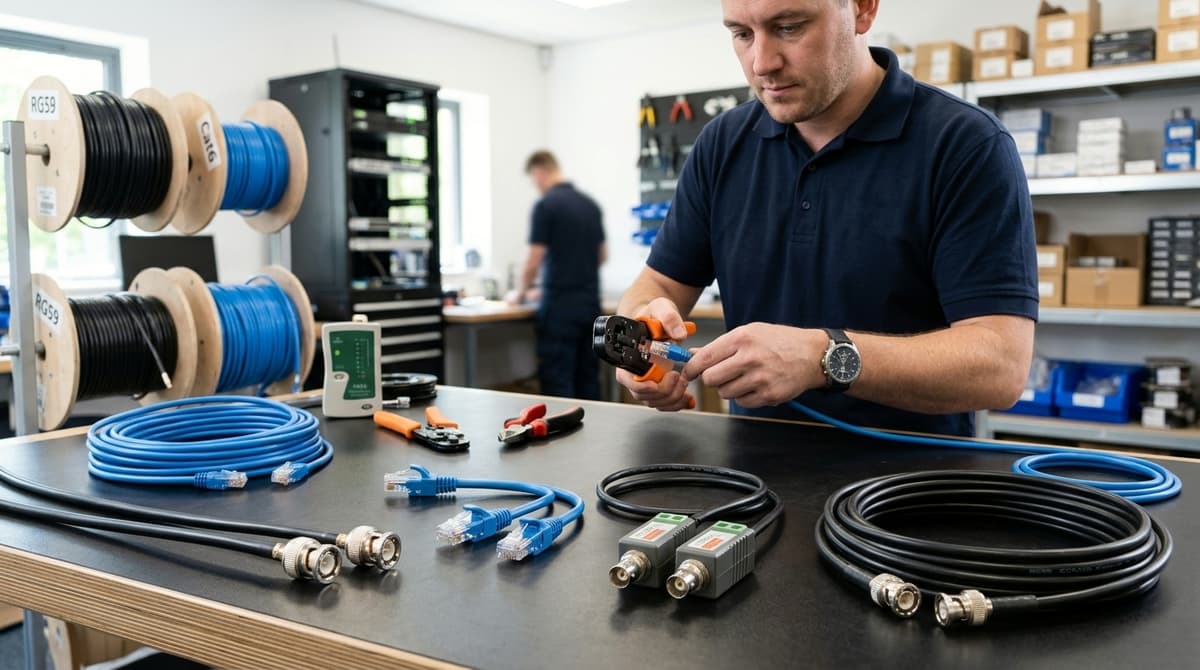
CCTV cable connectors must match both the cable and the camera's signal type: BNC suits coax (analogue, HD-TVI, AHD, CVI), RJ45 suits IP/PoE cameras on Cat5e/Cat6, and baluns bridge the two. A camera's label alone isn't enough, because an IP camera can't run over a BNC-terminated coax run, and a coax camera needs a balun before it can use UTP. Check what your camera actually outputs, then pick the connector, termination method and tool to suit, from a BNC crimp for RG59/RG6 to an RJ45 for network cable.
Which CCTV cable connector suits your cable and camera?
Match the connector to the cable: BNC crimp for coax, RJ45 for network cable, a 2.1mm DC pair for 12V power, and an RCA phono plug for audio.
| Camera / signal | Cable | Connector | Termination | Tool needed |
|---|---|---|---|---|
| Analogue, HD-TVI, CVI or AHD | RG59 or RG6 coax | BNC Male Crimp Connector | Crimp | BNC crimp tool |
| IP / PoE | Cat5e or Cat6 | RJ45 plug | Crimp | RJ45 crimp tool |
| Coax camera over twisted pair | UTP via a balun | BNC at the equipment end, RJ45 at the cable end | Plug-in balun, RJ45 crimp on the cable | RJ45 crimp tool |
| 12V camera power | Power cores | 2.1mm DC plug and socket pair | Terminal or solder, depending on the plug | Small screwdriver or soldering iron |
| CCTV audio | Audio lead | RCA Phono Male Solder Connector | Solder | Soldering iron |
- Coax: Our BNC crimp plug is listed for both RG59 and RG6 at £0.54 each, which makes it the default for any analogue or HD-over-coax run. It suits bare cable you are terminating yourself. A US supplier's BNC crimp listing notes the same type is not for premade siamese leads that already have moulded ends.
- IP/PoE: Standard RJ45 crimp plugs for Cat5e are sold across the trade, for example in Platinum CCTV's connector range. Use a crimp rated for the cable you are fitting.
- Balun: This is the option for reusing existing UTP behind a coax camera. Balun pairs are sold for HD-CVI, TVI and AHD as well as analogue.
- DC power: Check the camera's barrel size before buying, because 2.1mm is common but 2.5mm exists. For a camera on a leisure battery, our CCTV for Caravan: 4G, Battery or Mains? guide covers the power options.
- Audio: Solder the RCA plug to the audio lead. It is the only row here where you need a soldering iron.
BNC connectors for CCTV: crimp, twist-on or compression?
Crimp is the BNC type we stock for CCTV, and our BNC Male Crimp Connector for RG59 and RG6 cable is £0.54 including VAT. It has a metal body and goes on with standard crimping tools.
Twist-on and compression BNC connectors also exist. Platinum CCTV lists a twist-on, a weatherproof compression fitting and a crimp version, all for RG-59. Crimp is the BNC type in our Connectors range, so if you want twist-on or compression, check the category page before assuming we carry it.
Male, female and joining runs
A male BNC goes on the end of the cable. Female BNC sockets sit on couplers and on the camera and recorder. A female-to-female coupler joins two BNC runs, and Platinum CCTV lists a splice connector for extending BNC cables, which is the usual answer to a CCTV cable extension connector.
Where a crimp BNC is the wrong choice
Crimp connectors are for cable you terminate yourself. CCTV Camera Pros states that its two-piece BNC crimp for RG59U is not intended for premade siamese cable that already has moulded ends. Treat that as a rule for any crimp BNC.
Two-piece crimp connectors are also designed around a matching crimp tool. Check the tool named on the listing before you buy, and strip the cable to the length the connector calls for.
RJ45 connectors and baluns: where Cat5e/Cat6 meets CCTV
Fit RJ45 plugs when the camera and recorder are IP or PoE on Cat5e/Cat6. Use a balun only when a coax-format HD-TVI, AHD or CVI camera has to travel over that same twisted pair instead of RG59.
An IP camera already speaks Ethernet, so it needs no conversion. A balun converts between the BNC on a coax-format camera or DVR and an RJ45 on the UTP run.
These pitfalls are general installer guidance rather than datasheet figures:
- Passive balun with an IP camera: don't plug an IP camera's network port into a passive balun pair. Baluns carry coax-format video, not Ethernet.
- Mixed cable types: where a run changes between BNC on RG59 and RJ45 on Cat6, confirm which end holds the balun before you terminate anything. Each end of the UTP section needs a matching balun.
- Format and resolution: check that the balun supports your camera's signal type and megapixel count. One Platinum CCTV listing describes a passive pair for HD-CVI/TVI/AHD/CVBS cameras up to 5MP with DC suppression protection. That is the listing's own specification, so read the datasheet for whichever pair you buy.
- Power: a balun run still needs 12V at the camera, from a local supply or a separate power route.
For the coax end of a balun run, our BNC Male Crimp Connector for RG59 and RG6 is listed at £0.54. The Connectors category under Accessories holds the rest of our BNC, DC and wire connectors. Check the balun or RJ45 coupler you need against the camera's datasheet before ordering.
Can a CCTV cable be joined, and how do you connect the camera wires?
Yes, a CCTV cable can be joined with a BNC coupler for coax video or an RJ45 coupler for network cable, but every joint is a potential failure point. Keep joins to a minimum and put any outdoor joint inside a suitable weatherproof enclosure. A join also adds to the total run, so check the finished length against our shotgun cable max run lengths guide.
Connecting shotgun cable at the camera
Shotgun cable is a BNC video lead and a 2-core DC power lead side by side, so each end needs two terminations.
- Video: crimp a BNC plug onto the coax. Our BNC Male Crimp Connector is made for RG59 and RG6 cable and costs £0.54. Crimp connectors are for cable you terminate yourself, not for pre-made leads that already have moulded ends, as this connector listing also notes.
- Power: finish the two cores with a 2.1mm DC plug and socket pair, matching positive and negative to the marking on the camera or supply.
Check the plug size before buying. Most camera plugs are 5.5 × 2.1mm, but some are 5.5 × 2.5mm. The two look alike and are not a reliable fit, so confirm against the camera specification.
For joining the power cores mid-run with lever connectors and similar, see our guide to wire connectors for CCTV power.
Termination checklist and what a bad connector costs you
Six checks, done before the cable is clipped or buried, are the cheapest way to avoid re-running a cable.
- Identify the signal type. Coax video takes a BNC, DC power takes a barrel plug, and IP or PoE cameras take RJ45 on network cable.
- Match the connector to the cable. The BNC male crimp connector for RG59 and RG6 cable suits those coax types, and a barrel plug must match the camera's power input.
- Strip to the connector's spec. Take the strip lengths from the product datasheet or installation guide rather than guessing.
- Crimp with the right tool. Use a crimper made for that connector style, not pliers.
- Test before mounting. Check continuity, then confirm a live picture or link while the cable end is still easy to reach.
- Weather-protect outdoor joints. Put exposed joints inside a suitable enclosure so moisture stays out.
A bad termination usually shows up as an intermittent picture or dropouts. By then the cable may be clipped or buried, so the connector has to be redone in place, or the run replaced, on a second visit.
The cost is easiest to see as a formula: re-termination labour (hours × the installer's rate) plus any extra visit, set against the connector price. That BNC is £0.54, so the part is almost irrelevant to the outcome.
Fitting is for your own electrician or an independent installer, who can be NSI or SSAIB-accredited if you want accreditation. CCTV Master sells the equipment and does not install it.