
cctv for warehouse
CCTV for Warehouses UK: Zone-by-Zone Camera Planning
CCTV for a warehouse is specified zone by zone, with racking aisles, dock doors and the yard each getting their own camera type, mounting height and recording…
On this page
- What does CCTV for a warehouse need that a shop or office doesn't?
- How do you cover high-bay racking and read pallet labels?
- Lens choice and targets
- PTZ and blind spots
- How do you power and cable cameras across a large open floor?
- When 12V is the better fit
- Wall mounting at docks and exteriors
- How do you handle dock doors, the yard and low light?
- Two cameras per door
- Mixed light at the door
- The yard after dark
- How many cameras, how long to record, and what should an installer quote?
- Camera count
- Retention for stock-loss disputes
- What an installer should quote
CCTV for a warehouse is specified zone by zone, with racking aisles, dock doors and the yard each getting their own camera type, mounting height and recording rule, rather than a single "cameras per m²" figure. Camera count, cable runs and storage all follow from three things: the ceiling height, the distance to each target and how long you must keep footage. The figures in this guide are planning assumptions, so check them against the datasheets for the cameras and recorder you intend to buy.
What does CCTV for a warehouse need that a shop or office doesn't?
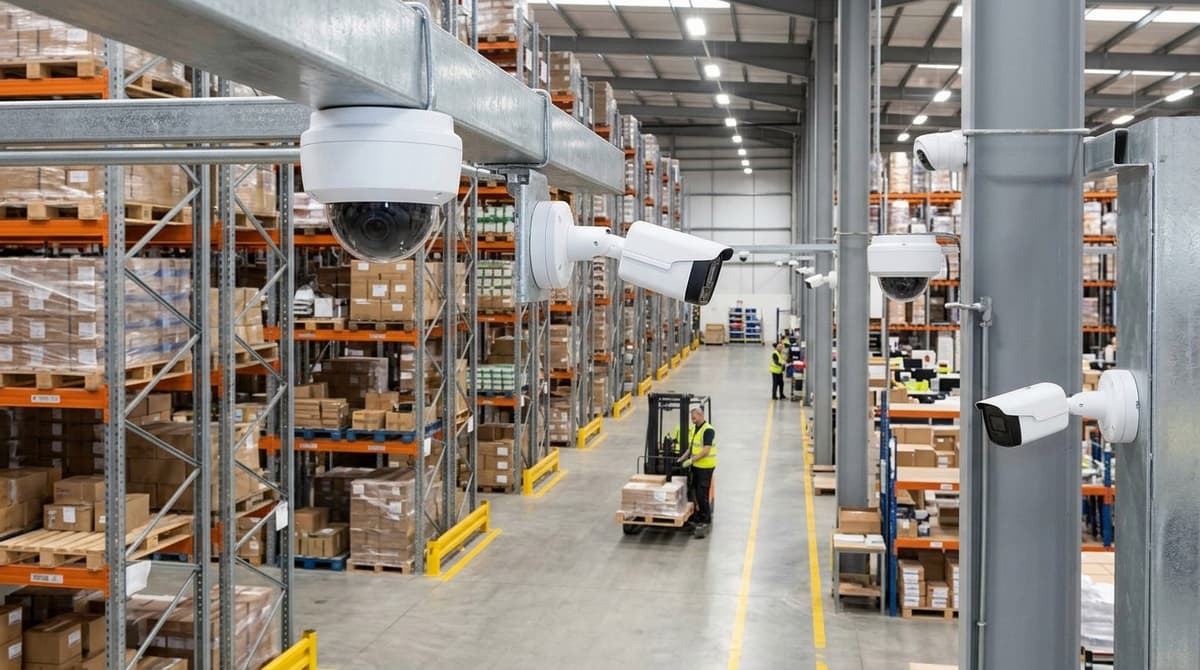
Ceiling height, sheer scale, moving forklifts, mixed lighting and round-the-clock use make warehouse CCTV a different design problem from a shop or office.
Ceilings come first. cctvplanner.io puts warehouse ceilings at around 6 m in smaller distribution centres and 15 m or more in high-bay racking. It also notes that mounting a camera at full height sharply cuts pixel density on the subject. A camera that would identify someone in a shop may only show you that a figure is present.
Lighting and traffic add to the problem. Large open spaces, skylights, dock doors and constantly moving forklifts are typical of warehouse sites, and the stock needs watching around the clock. A camera facing a dock door may have to cope with bright daylight outside and a dark yard beyond, and it has to record 24/7.
So, do warehouses have cameras? Commonly, yes. The real question is which zones need identification-grade detail and which only need an overview. Dock doors, pedestrian entrances and goods-in usually need detail, and it helps to plan those alongside access control specified with CCTV. Aisles, racking runs and yards can often settle for overview coverage.
How do you cover high-bay racking and read pallet labels?
Put cameras at the aisle ends looking down each aisle, and choose them by distance to the label rather than by megapixel count.
CCTV Planner's warehouse guide puts ceilings at roughly 6 m in smaller sites and 15 m or more in high-bay racking, and notes that mounting at full ceiling height drastically reduces pixel density. A camera at the aisle end has a much shorter throw to the pallet faces, which helps legibility more than a higher-resolution sensor at roof level. The trade-off is an oblique view along one aisle, so very long aisles may need a camera at each end.
Lens choice and targets
A wide lens covers more floor but gives up detail at distance. A varifocal lens lets the installer set each position's field of view on site, which suits aisles of differing length.
Base your targets on the datasheet's DORI table (Detection, Observation, Recognition, Identification), which follows BS EN 62676-4, rather than a pixel-density figure from a forum. DORI has no "read a pallet label" category, so test it. Fit one camera, pull a still at the real aisle distance and confirm the labels are legible before you buy for the other aisles.
PTZ and blind spots
A PTZ works as a supplement over large open floors such as marshalling areas. It can only point at one place at a time, so it can't replace fixed cameras on the aisles.
Racking and raised forklift masts both create shadow. Walk the floor with the camera plan in hand, and ask your electrician or independent installer to check sightlines from each camera position, including with a truck parked in the aisle.
How do you power and cable cameras across a large open floor?
Feed local PoE switches in cabinets from a backbone link, rather than pulling every camera cable back to one rack. Copper Ethernet has a maximum run length, and on a big open floor the far cameras can easily end up beyond it. Mount cabinets on columns or walls near each camera cluster, with one uplink from each back to the recorder room.
Camera count sets your port count, so settle it first using our guide on how many cameras you need. Then size each cabinet's switch like this:
PoE budget (W) = (camera 1 W + camera 2 W + … + camera n W) + headroom
Take every wattage from the camera's own datasheet rather than a rule of thumb. Leave headroom for cameras you add later, and check the total against the switch's overall PoE budget as well as its per-port rating. For outdoor stretches such as dock walls, use external-rated cable and choose between Cat6 and Cat5e according to the run.
When 12V is the better fit
For 12V cameras, a central power distribution box in an enclosed metal housing can feed several cameras from one point and protect the connections physically. Check each camera's datasheet for its voltage and current draw. Long 12V cable runs lose voltage along the way, so keep them short or step up the cable size.
The mains connection to any power supply should be made by your own electrician, not left to the camera installer's improvisation.
Wall mounting at docks and exteriors
For dock walls and building exteriors, choose a wall bracket rated for the camera's weight and the exposure it will face. Check the camera's datasheet and installation guide for the recommended mount and fixings. Your own electrician or an independent accredited installer (NSI or SSAIB) can confirm the fixing method for the wall type.
How do you handle dock doors, the yard and low light?
Fit two cameras per dock door, choose models with a stated wide dynamic range, and treat the unlit yard as a separate night-vision job.
Two cameras per door
An inside camera covers goods and process: what is loaded, checked and handled. An outside camera covers the vehicle and trailer. Asking one camera to do both usually means it does neither well.
Plate capture needs its own camera. An overview camera is a poor plate reader, so put a dedicated one where vehicles approach slowly and under control. IDS CCTV places licence plate cameras at entry and exit gates for this reason. Our ANPR guide on what these systems check covers the detail.
Mixed light at the door
IDS CCTV names skylights and dock-door lighting among the awkward conditions in warehouses. CCTV Planner likewise flags fluctuating light at loading docks. With a door open in daylight and a dark interior behind it, a camera tends to expose for one or the other.
Check each datasheet for its wide-dynamic-range rating and its minimum-illumination (lux) figures. Compare those published numbers rather than trusting "WDR" in a product title.
The yard after dark
Unlit yards are a different problem from door glare. Our night-vision guide compares IR with ColorVu, and the CCTV for sites guide covers perimeter and yard coverage, so neither is repeated here.
How many cameras, how long to record, and what should an installer quote?
Count cameras by zone, size storage from the datasheet bitrate for the days you genuinely need, and get both written into an itemised quote.
Camera count
Use this formula: cameras = aisle cameras (one per aisle end, or one per aisle pair where the lens reaches) + dock doors × 2 + yard and gate cameras + entrances. The two cameras per dock door cover the loading threshold and the trailer or vehicle in front of it.
Here is an illustrative example, not a survey. Take a hypothetical 5,000 m² unit with 8 aisles, 6 dock doors, 2 yard or gate cameras and 2 entrances. With one camera per aisle pair, that is 4 + 12 + 2 + 2 = 20 cameras.
A second hypothetical 5,000 m² unit used for block stacking has 2 aisles, 2 dock doors, 1 gate camera and 1 entrance. That gives 1 + 4 + 1 + 1 = 7 cameras. The floor area is identical, but the counts are 20 and 7, so per-m² figures mislead and layout drives the number.
Where a remote yard has no mains nearby, the power and 4G options in our building site CCTV guide apply equally to a gate camera.
Retention for stock-loss disputes
Storage (MB) = bitrate (Mbit/s) × seconds × cameras ÷ 8. Divide by 1,000 for GB. Take the bitrate from each camera's datasheet and leave it as a variable, because resolution, frame rate and codec all move it. Seconds are days × 86,400.
UK law sets no fixed period. Under UK GDPR, keep footage no longer than your stated purpose needs, and record the period you choose. For stock-loss disputes, base it on how long your stock counts take to reveal a discrepancy.
What an installer should quote
Ask an independent NSI or SSAIB installer to itemise:
- camera count by zone, with lens and mounting height for each
- recorder channels, with spare capacity
- drive capacity, with the bitrate and retention days it assumes
- PoE switch budget and cable runs
- signage and handover
An installer who quotes only a headline price per camera has not shown their working.
Frequently asked questions
Do warehouses have cameras?
Most do, but the useful question is which zones need identification-grade detail, such as dock doors and yards, and which need overview only, such as racking aisles. Splitting the site this way keeps the camera count and the recording load sensible.
Which CCTV camera is best for warehouse?
No single model suits every area. Racking aisles, dock doors and yards need different lenses and mounting, and detail must be checked against each datasheet at the real distance involved. Specify the identification zones first, then fill the overview areas. Treat any camera count or pixel figure as a planning assumption until an installer confirms it on site.
Does ceiling height affect warehouse CCTV?
Yes. According to cctvplanner.io, warehouse ceilings range from about 6 m to over 15 m, and pixel density on the floor falls as mounting height rises. Check each datasheet at your actual distance to the target rather than relying on headline resolution, and consider lower mounting points where identification matters.
Can a company watch you on CCTV?
Yes, an employer or site operator can lawfully use CCTV, but UK data protection rules apply. Have a documented purpose, display clear signage, limit who can view footage and set a retention period. Take particular care in staff areas, and check the ICO's guidance before recording.
How much does warehouse CCTV cost?
Cost depends on camera count, ceiling height, cable runs and storage, so a single fixed price would mislead. Our CCTV installation cost guide for shops, offices and warehouses covers UK installation costs. Ask installers to quote by zone, itemising cabling, access equipment and retention days.
Sources & references
- cctv
- warehouse
Written by
CCTV Master Editorial Team
CCTV Master's guides compare the cameras and recorders we stock on the specifications that matter, with every figure checked against the manufacturer's datasheet before publication.
Related reading
- PoE CCTV System: Camera, Switch & NVRpoe cctv system
- Best CCTV System 2026: UK Buyer's Frameworkwhat is the best cctv system
- 4K CCTV Cameras for UK Homes | Best Security Systemscctv cameras 4k
- Commercial CCTV Camera Guide for UK Sites (2026)commercial cctv camera
- CCTV and Christmas Parcel Theft UK: What Footage Works (2026)cctv and christmas parcel theft uk
- What Size PoE Switch for 8 CCTV Cameras? UK Guide 2026what size poe switch do i need for 8 cctv cameras